Posts

AWS CLI — Multiple profiles

How to take advantage of multiple profiles feature! (with examples and tips) Why and How? The cloud environment should have multiple accounts, according to AWS best practice “Well-Architected Framework.” Based on the security requirements, each account has different groups, roles, and users. In such a configuration, you may have multiple profiles to use on a daily basis, either between different accounts or even within the same account, with each profile having different permissions or roles. Setting up Multiple Profiles Here is how you can add multiple profiles on AWS CLI To create multiple AWS CLI profiles, you can use the aws configure command. This command will prompt you for information such as your AWS Access Key ID and Secret Access Key, as well as the default region and output format for your profile. To create a new profile, you can use the — profile option, followed by the name of your profile. For example, if you wanted to create a profile named “dev”, you could use the foll...
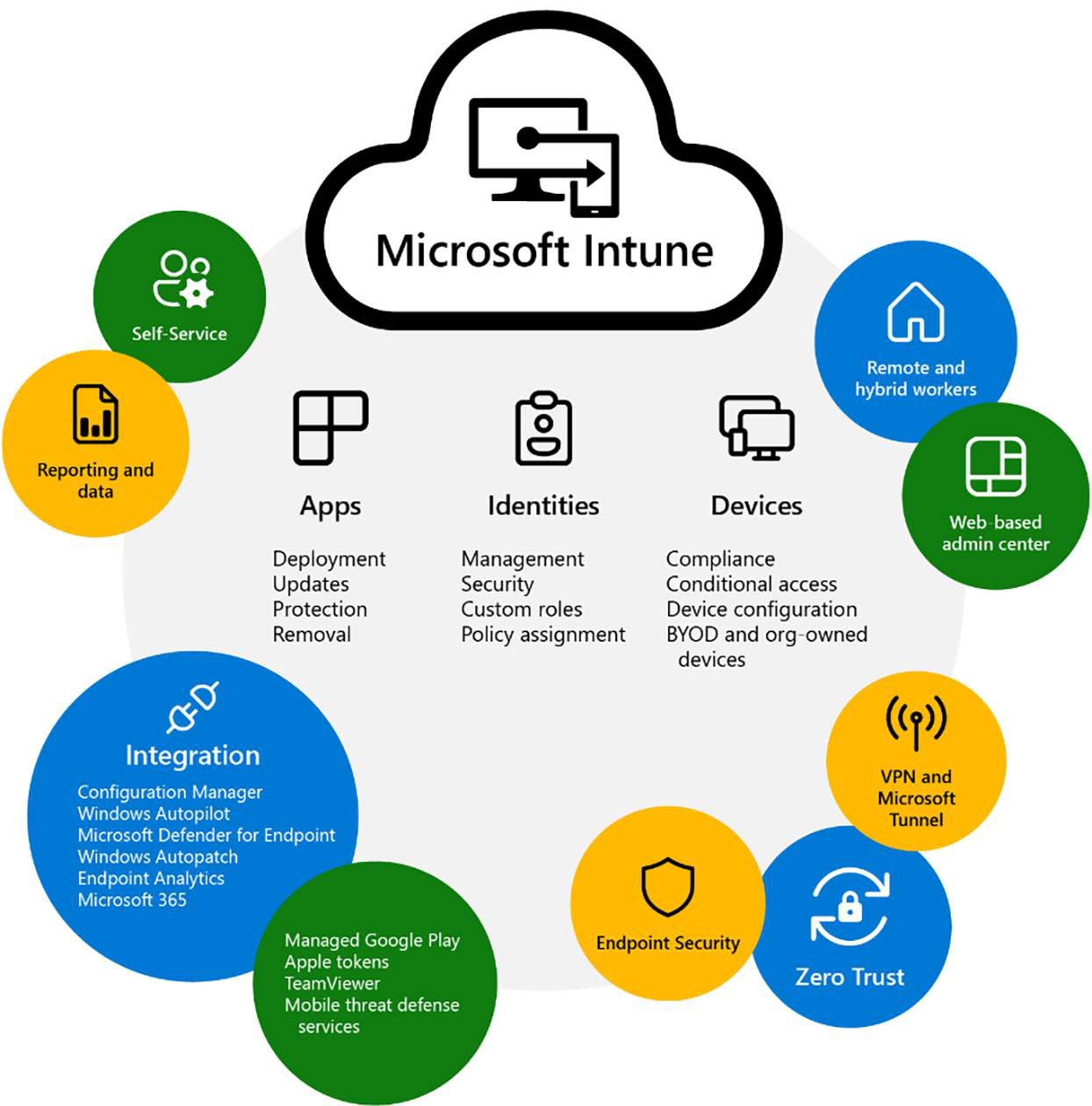
Microsoft Inune

Image
 Microsoft Intune is a family of products and services that helps businesses manage and maintain all their devices, regardless of whether it’s a physical device, or a cloud-connected device endpoint. The Intune family includes: •  Microsoft Intune •  Configuration Manager and co-management  •  Endpoint analytics •  Windows Autopilot •  Intune admin center •  Intune Suite  Microsoft Intune provides a holistic management experience while adding new functionality and in- telligent actions, such as anomaly detection in Advanced Endpoint Analytics and remediation scripts that can proactively resolve end user issues before they see an issue – without any complex migration or disruption of productivity. It provides several assets to aid your transition to modern management while also increasing customers’ security and helping them move to the cloud. Microsoft Intune also includes management capabilities for different endpoints. To summarize: 1....

Difference between AWS CloudWatch and CloudTrail

Image
CloudWatch  focuses on the activity of AWS services and resources, reporting on their health and performance. CloudTrail  is a log of all actions that have taken place inside your AWS environment. AWS CloudWatch AWS CloudWatch is a monitoring service for AWS cloud resources and the applications you run on AWS. You can use Amazon CloudWatch to collect and track metrics, collect and monitor log files, set alarms, and automatically react to changes in your AWS resources. AWS CloudTrail AWS CloudTrail is a service that enables governance, compliance, operational auditing, and risk auditing of your AWS account. With CloudTrail, you can log, continuously monitor, and retain account activity related to actions across your AWS infrastructure. CloudTrail provides event history of your AWS account activity, including actions taken through the AWS Management Console, AWS SDKs, command-line tools, and other AWS services. This event history simplifies security analysis, resource change tra...

Amazon Inspector

Image
An important component within the security management of organizations is the Technical Vulnerability Management part that involves carrying out a continuous process of reviewing the exposure and vulnerability status of your applications and all their associated components. Aligned with the Well-Architected Framework, precisely in the workload protection component, you have item SEC06-BP01: Perform Vulnerability Management, which recommends that you should “Frequently scan and patch for vulnerabilities in your  code, dependencies, and in your infrastructure to help protect against new threats.” In this sense, AWS offers the ability to address this important issue through Amazon Inspector. In Figure 1, you can see the general view. You just need to enable the service and it will automatically start the discovery process for EC2 instances, Container repositories, Container images, and Lambda functions. Figure 1- Amazon Inspector dashboard Amazon Inspector is an automated vulnerabilit...

Unifying AWS and Azure Security Operations with Microsoft Sentinel

Image
The Multi-Cloud Reality Most modern enterprises operate in multi-cloud environments using Azure for core workloads and AWS for development, storage, or DevOps automation. While this approach increases agility, it also expands the attack surface. Each platform generates its own telemetry: Azure: Activity Logs, Defender for Cloud, Entra ID sign-ins, Sentinel analytics AWS: CloudTrail, GuardDuty, Config, and CloudWatch Without a unified view, security teams struggle to detect cross-cloud threats promptly. That’s where Microsoft Sentinel comes in, bridging Azure and AWS into a single, intelligent Security Operations Center (SOC).   Architecture Overview   Connect AWS Logs to Sentinel AWS CloudTrail via S3 Connector Enable the AWS CloudTrail connector in Sentinel. Provide your S3 bucket and IAM role ARN with read access. Sentinel will automatically normalize logs into the AWSCloudTrail table. AWS GuardDuty Connector Use the AWS GuardDuty API integration for threat detection telemet...