Posts

Planning Vnet subnet segmentation

Image
Planning Vnet subnet segmentation To provide isolation within a Vnet, we can divide it into one or more subnets. Subnets are primarily used for workload segmentation (logical perimeters within a Vnet). Figure 1.8 shows an example of this. In the diagram, we have a Vnet with two subnets. Web services are deployed into their ownsubnet (Web tier Subnet) and data services are deployed into their own subnet (Data tier Subnet). With this approach, we can use an Azure route table to control how traffic is routed between the subnets. We can also use a network security group (NSG) or a network virtual appliance (NVA ) to define allowed inbound/outbound traffic flow from/to the subnets (segments). The result of this is that if a part of our application stack is compromised, we are better placed to contain the impact of the security breach and mitigate the risk of lateral movement through the rest of our network. This is an important Zero Trust principle implementation. Figure – Segmentation usin...

Planning Vnet naming

Image
Planning Vnet naming All Azure resources have a name that must be unique within a scope. The scope is different for each resource type. When creating a Vnet, its name must be unique within the scope of the resource group. This means that it is possible to have two Vnets in your Azure subscription with the same name as long as they don’t belong to the same resource group! This can be useful in a design that involves having the same Vnet resource name for both development and production environments, as shown in Figure. Figure  – Vnet names must be unique for the resource group scope Even though it is possible to have duplicate names within a subscription, it is not a recommended practice as it could later lead to confusion when investigating security incidents using logging information (we will cover network logging and monitoring later in this book). When investigating security incidents, it helps to be able to quickly identify affected resources and having a unique resource naming...

Planning VNet location

Image
Planning VNet location Almost all Azure services are created in a regional location specified at creation time. I said almost all because there are some exceptions – so-called global or non-regional services that are not pinned to a region. Azure Vnet is a regional service. The Azure cloud has 55 active regions in which we can create Vnets (with nineteen announced regions coming soon). So, which regions should you select when creating Vnets? Consider the following three points to guide your decision regarding this:  Business compliance requirements: This is the first point that you should consider when deciding the Azure region to locate your Vnets in. If there are organizational/industry compliance requirements that require data residency or data sovereignty in a geographic area, then you must adhere to that! You don’t want to end up in a situation where your organization is fined or charged for violating governmental regulations! For example, if you are providing services to a US...

Enabling AWS Security Hub

Image
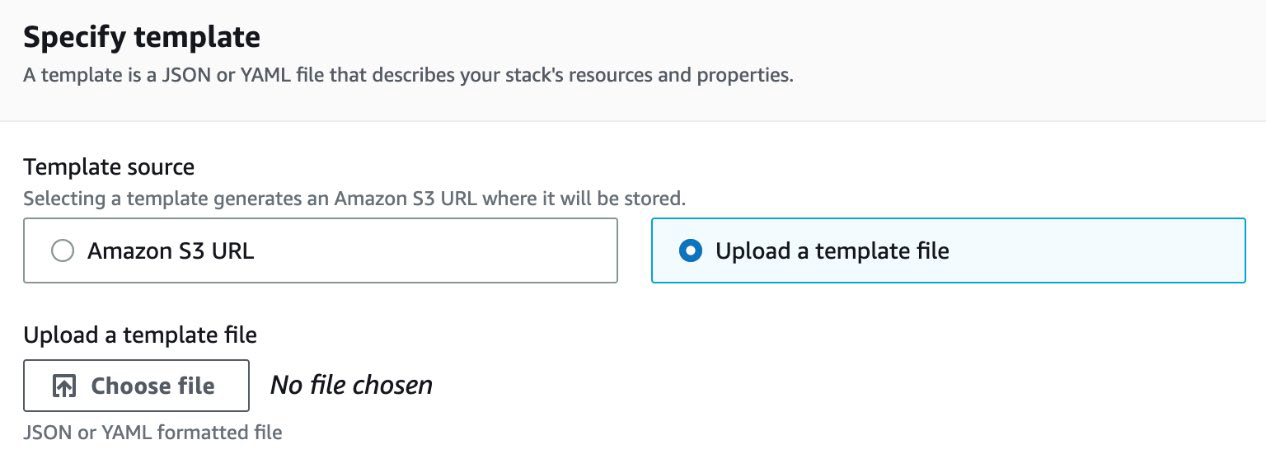
AWS Security Hub can be enabled from the AWS Management Console. However, because Security Hub needs to have the AWS Config service enabled (and prefers to have it fully enabled, watching all resources), you will follow the following steps via CloudFormation in this walk-through as well – all via the Management Console: 1. Go to https://console.aws.amazon.com/securityhub/ to access the AWS Security Hub main page. 2. Click on the orange button labeled Go to Security Hub to start the process of enabling Security Hub. 3. You should be brought to a page labeled Enable AWS Security Hub. In the first section labeled Enable AWS Config, click on the Download button to download the CloudFormation script to quickly set up a full version of the AWS Config service for Security Hub. The file should be named EnableAWSConfig.yml. 4. In a new tab, go to https://console.aws.amazon.com/cloudformation/ to open the CloudFormation main page. Make sure that, at the top of the screen, you can see you are in ...

Understanding Azure VNet

Image
Understanding Azure VNet Before we get too far into Azure networking concepts, let’s establish what Azure VNet is and the capabilities that it provides. A VNet is a virtual version of a physical network, implemented on the Azure cloud platform. The main advantage that it has over a traditional network is that we don’t need to implement or maintain the underlying physical hardware for this network (these responsibilities are offloaded to our cloud provider – Microsoft). But for the most part, we can achieve similar capabilities and architectures that we can achieve on-premises. We can even implement more flexible architectures with Azure VNets due to the software-defined nature. So, what capabilities does Azure VNet provide? Here is a short list of some use cases: • Connectivity for supported Azure services including VM, virtual machine scale sets (VMSSs), and 32 other services • Native Internal TCP/UDP Load Balancing and proxy systems for Internal HTTP(S) Load Balancing • Connects to o...

Product Feedback for Azure Network Watcher

  Feedback Summary: Azure Network Watcher is an essential network monitoring and diagnostics tool within the Azure ecosystem. It provides various capabilities to help users monitor, troubleshoot, and diagnose network-related issues in Azure environments. While it offers powerful features for network visibility, there are areas where enhancements could further improve its usability, depth of insight, and integration with other Azure services. Positive Aspects: Comprehensive Network Diagnostics : Azure Network Watcher offers a wide range of network monitoring features like IP flow verify , Network Security Group (NSG) flow logs , and connection troubleshoot tools. These features provide great insights into traffic patterns, security configurations, and network connectivity. Connection Monitor and Topology View provide useful visualizations and diagnostic information that simplifies troubleshooting for users, especially for complex environments with multiple resources. ...

Security Alerting with AWS Security Hub

Image
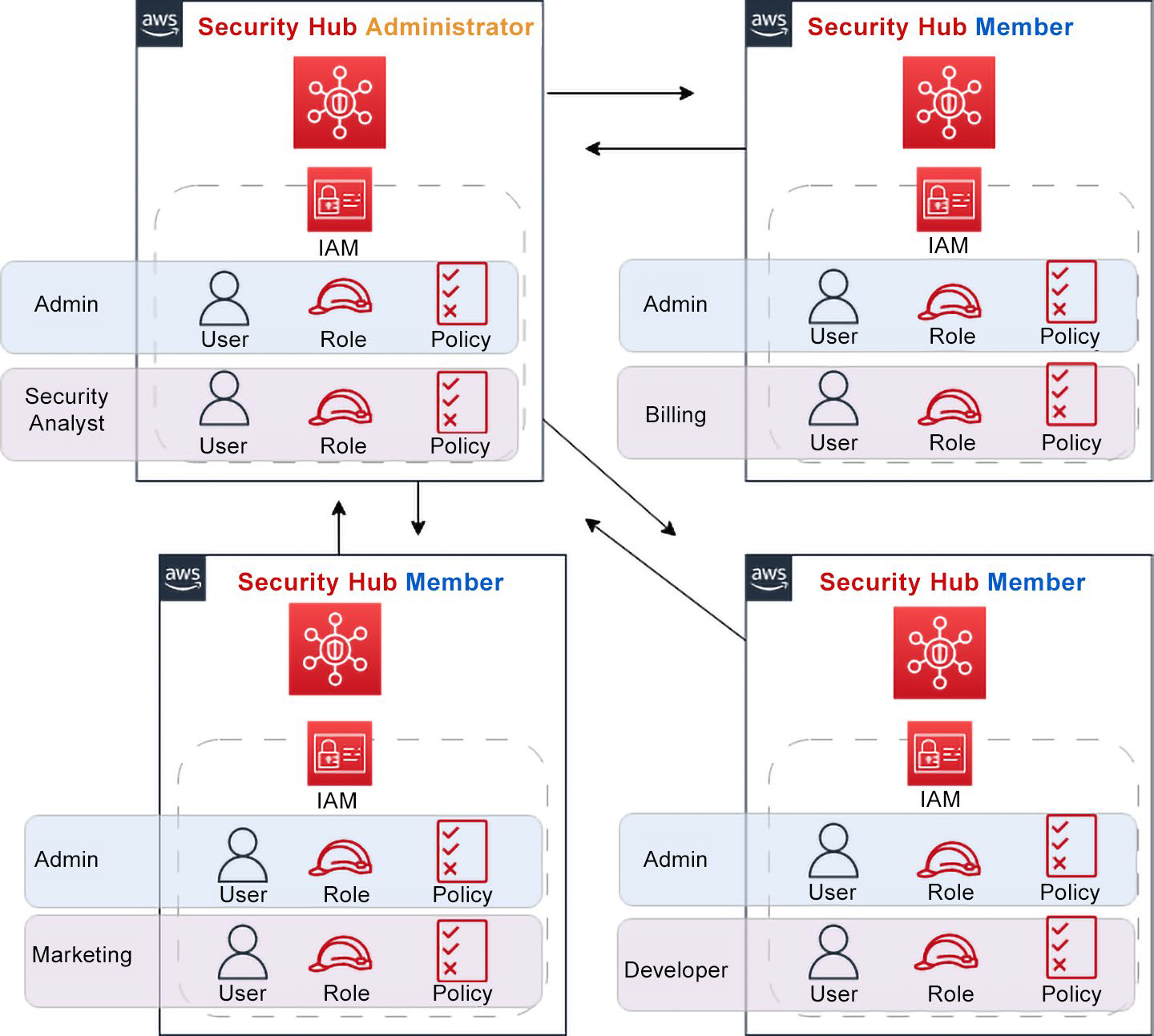
     With so many security tools available in both AWS and from third-party providers, those that are responsible for managing the alerts need a single pane of glass to centralize all the alerts and notifications coming in. AWS Security Hub helps you consolidate many of your security findings, alerts, and compliance reports from AWS services, including the following: • AWS Identity and Access Management (IAM) • Amazon Macie • Amazon GuardDuty • Amazon Inspector • AWS Firewall Manager In addition to these native AWS services, AWS Security Hub can be incorporated into any third-party partner solutions, such as Sumo Logic, Splunk, and other vendors you might use in your organization. A complete list of these partners can be found at https://aws.amazon.com/securityhub/partners/. The Security Hub service allows you to categorize and prioritize all the events coming in from various sources. This single-pane-of-glass view gives you a more comprehensive picture and a deeper under...

Enabling Amazon GuardDuty

Image
     Amazon GuardDuty is a regional service. You must first select the region where you will enable the service; once that is done, it is effortless to enable it. Just complete the following steps: 1. From the Amazon Management Console, find the GuardDuty service by going to Services > Security, Identity, & Compliance > GuardDuty, or search for GuardDuty in the top search bar. 2. Once on the GuardDuty page, click the orange Get Started button to enable the GuardDuty service. 3. This will bring you to the Enable GuardDuty page. GuardDuty needs to create a service role to monitor and protect your account. Since data is involved, click on the orange Enable GuardDuty button at the bottom of the page to allow GuardDuty to be enabled. After enabling GuardDuty, you will be brought to the main GuardDuty page (that is, the Findings page) by default. Since you have just enabled the service, three zeros in the page’s top right-hand corner should indicate no high-, medium-,...

Understanding the Differences between GuardDuty and Amazon Macie

Image
     Amazon Macie is a fully managed security service that helps organizations enhance data protection and compliance in their AWS environment. Leveraging machine learning, Macie automatically identifies and classifies sensitive data stored in Amazon S3, enabling users to gain insights into their data security posture, detect potential threats, and implement access controls and data protection measures. With customizable policies, compliance reporting, and integration with AWS CloudTrail, Macie empowers organizations to proactively safeguard sensitive information, respond to security incidents, and adhere to data privacy regulations. Although there are a few similarities between the GuardDuty and Macie services, they each perform different security functions. Both services use machine learning, but apart from that, their functions differ. Amazon Macie concentrates on finding Personally Identifiable Information (PII) in your account so that you do not leave PII exposed or...

How GuardDuty Works

Image
     After enabling the GuardDuty service, data is collected from the aforementioned three sources and begins to be analyzed. The service can analyze tens of billions of events from multiple data sources, which are vetted for threat intelligence; it looks for abnormal activity on your account in this manner. If GuardDuty notices anomalous or malicious activity, it will give a ranking to the item as high, medium, or low. This ranking helps you, as the security professional, decide which events you should follow up on and in which order. The findings that GuardDuty produces are delivered to Security Hub, your designated S3 bucket, and CloudWatch Events/Eventbridge simultaneously. This setup of delivering findings assumes that you have the Security Hub service up and running. Connecting GuardDuty to Security Hub allows you to view and manage all the events from the GuardDuty service and the other security services with which Amazon Security Hub can connect. Adding a connecti...